<?xml version="1.0" encoding="utf-8"?><feed xmlns="http://www.w3.org/2005/Atom" ><generator uri="https://jekyllrb.com/" version="4.4.1">Jekyll</generator><link href="https://onyxmueller.net/feed.xml" rel="self" type="application/atom+xml" /><link href="https://onyxmueller.net/" rel="alternate" type="text/html" /><updated>2026-08-16T14:05:48-06:00</updated><id>https://onyxmueller.net/feed.xml</id><title type="html">Onyx Mueller</title><subtitle>Blog posts, videos, projects, and more from a passionate leader, software developer, entrepreneur, and technology evangelist.</subtitle><entry><title type="html">Counting Builds with Git Tags</title><link href="https://onyxmueller.net/2026/07/05/counting-builds-with-git-tags/" rel="alternate" type="text/html" title="Counting Builds with Git Tags" /><published>2026-07-05T00:00:00-06:00</published><updated>2026-07-05T00:00:00-06:00</updated><id>https://onyxmueller.net/2026/07/05/counting-builds-with-git-tags</id><content type="html" xml:base="https://onyxmueller.net/2026/07/05/counting-builds-with-git-tags/"><![CDATA[<p>I’ve been writing here about leadership, technology, and mobile engineering for years, and somehow I’ve never written about my most popular open source project. It’s <a href="https://github.com/marketplace/actions/build-tag-number">Build Tag Number</a>, a GitHub Action that counts.</p>

<h2 id="the-problem">The Problem</h2>

<p>For much of my career, I’ve built mobile apps and led mobile organizations. Mobile apps have a rule: build numbers only go up. Google Play rejects an app bundle whose <code class="language-plaintext highlighter-rouge">versionCode</code> isn’t higher than the previous one. TestFlight is just as strict.</p>

<p>GitHub gives you <code class="language-plaintext highlighter-rouge">GITHUB_RUN_NUMBER</code> out of the box which can be used for build numbers, and for plenty of teams that’s fine. But it’s scoped to a single workflow. Split your CI into separate workflows for PRs and releases, and now you have two counters that disagree with each other. And you can’t seed it. If you’re migrating from something like Jenkins and your last build was 4,873, GitHub cheerfully starts you back at 1.</p>

<p>I wanted one counter for the whole repo that I could start anywhere.</p>

<h2 id="usage">Usage</h2>

<div class="language-yaml highlighter-rouge"><div class="highlight"><pre class="highlight"><code><span class="na">jobs</span><span class="pi">:</span>
  <span class="na">build</span><span class="pi">:</span>
    <span class="na">runs-on</span><span class="pi">:</span> <span class="s">ubuntu-latest</span>
    <span class="na">steps</span><span class="pi">:</span>
    <span class="pi">-</span> <span class="na">name</span><span class="pi">:</span> <span class="s">Generate build number</span>
      <span class="na">uses</span><span class="pi">:</span> <span class="s">onyxmueller/build-tag-number@v1</span>
      <span class="na">with</span><span class="pi">:</span>
        <span class="na">token</span><span class="pi">:</span> <span class="s">${{ secrets.github_token }}</span>
    <span class="pi">-</span> <span class="na">name</span><span class="pi">:</span> <span class="s">Print new build number</span>
      <span class="na">run</span><span class="pi">:</span> <span class="s">echo "Build number is $BUILD_NUMBER"</span>
</code></pre></div></div>

<p>Every later step gets a <code class="language-plaintext highlighter-rouge">BUILD_NUMBER</code> environment variable. There’s also a step output, <code class="language-plaintext highlighter-rouge">steps.buildnumber.outputs.build_number</code>, if you wanna pass it to other jobs. I feed it to Gradle as the <code class="language-plaintext highlighter-rouge">versionCode</code>.</p>

<h2 id="the-trick-your-repo-is-already-a-database">The trick: your repo is already a database</h2>

<p>The counter is a git tag. When the action runs it finds the ref <code class="language-plaintext highlighter-rouge">build-number-42</code>, creates <code class="language-plaintext highlighter-rouge">build-number-43</code> on the current commit, and deletes the old one.</p>

<p>Here’s why I like this design:</p>

<ul>
  <li><strong>No external service.</strong> Your repo already stores refs. It can store one more!</li>
  <li><strong>No extra commits.</strong> The tag rides along without touching your history.</li>
  <li><strong>It’s seedable.</strong> Moving from another CI system? Push <code class="language-plaintext highlighter-rouge">git tag build-number-4873</code> and the next build is 4874.</li>
  <li><strong>It’s fast.</strong> The whole action is one JavaScript file with zero npm dependencies. It calls the GitHub API with Node’s built-in <code class="language-plaintext highlighter-rouge">https</code> module. A build-number generator shouldn’t spend thirty seconds installing packages to add one to a number.</li>
</ul>

<h2 id="multiple-counters">Multiple Counters</h2>

<p>Got a client and a server in one repo? The <code class="language-plaintext highlighter-rouge">prefix</code> input gives each its own counter:</p>

<div class="language-yaml highlighter-rouge"><div class="highlight"><pre class="highlight"><code>    <span class="pi">-</span> <span class="na">uses</span><span class="pi">:</span> <span class="s">onyxmueller/build-tag-number@v1</span>
      <span class="na">with</span><span class="pi">:</span>
        <span class="na">token</span><span class="pi">:</span> <span class="s">${{ secrets.github_token }}</span>
        <span class="na">prefix</span><span class="pi">:</span> <span class="s">client</span>
</code></pre></div></div>

<p>That creates tags like <code class="language-plaintext highlighter-rouge">client-build-number-12</code>, independent from <code class="language-plaintext highlighter-rouge">server-build-number-31</code>. And if you want to keep every old tag as a paper trail, set <code class="language-plaintext highlighter-rouge">delete_previous_tag: false</code>.</p>

<h2 id="why-i-do-this">Why I Do This</h2>

<p>Build Tag Number is not impressive engineering. It adds one to a number! But it runs in pipelines I’ll never see, for developers I’ll never meet, and every so often one of them shows up in my issue tracker to tell me how they’re using it. Some send pull requests that make it better for everyone.</p>

<p>I’ve spent twenty-plus years building software for big brands. Watching a tiny tool I shared quietly help strangers still beats most of it. That feeling is why I do open source.</p>

<p>You probably have a small utility that scratches your own itch. I encourage you to share it.</p>

<p>And if your builds need numbers that only go up, <a href="https://github.com/marketplace/actions/build-tag-number">check this out</a>.</p>]]></content><author><name></name></author><category term="build" /><category term="engineering" /><category term="github-actions" /><category term="ci-cd" /><category term="automation" /><category term="mobile" /><summary type="html"><![CDATA[I’ve been writing here about leadership, technology, and mobile engineering for years, and somehow I’ve never written about my most popular open source project. It’s Build Tag Number, a GitHub Action that counts.]]></summary></entry><entry><title type="html">UniFi-ed</title><link href="https://onyxmueller.net/2026/05/31/unifi-ed/" rel="alternate" type="text/html" title="UniFi-ed" /><published>2026-05-31T00:00:00-06:00</published><updated>2026-05-31T00:00:00-06:00</updated><id>https://onyxmueller.net/2026/05/31/unifi-ed</id><content type="html" xml:base="https://onyxmueller.net/2026/05/31/unifi-ed/"><![CDATA[<p>My old router and I had a good run. It was the <a href="https://support.google.com/googlenest/answer/9583920?hl=en">Google Nest Wifi</a> lineup, the friendly mesh kit you set up quickly with an app. I liked it enough to put it in my parents’ house, my sister’s, and my brother’s, and to recommend it to anyone who asked. For a couple of years I didn’t think about my own at all, which is the nicest thing you can say about a router.</p>

<p>Then the mysteries started happening.</p>

<p>Devices would drop and reconnect for no reason I could find. The mesh point in the garage lost its backhaul about once a week and needed a power cycle to come back to life. A video call would stutter, I’d open the app to look, and by the time it loaded the problem had cleared on its own. Nothing I could reproduce, nothing the diagnostics would admit to, and no real way to see what was actually happening. A consumer router tells you the Wi-Fi is “good.” It will not tell you why your laptop just decided to talk to the point two rooms away.</p>

<p>So I did the calm, proportionate thing and rebuilt the entire network on <a href="https://ui.com/">UniFi</a>.</p>

<p>If you haven’t fallen down this particular hole, UniFi is Ubiquiti’s line of prosumer networking gear: gateways, switches, access points, cameras, the works, all managed from a single console. You buy the hardware once and the software is free for as long as you own the device. No subscription, no feature held hostage behind a monthly tier. VLANs, guest networks, firewall rules, intrusion detection, Wi-Fi schedules: all standard, all free. The Nest Wifi wasn’t hiding these settings from me. It just didn’t have them. You got a guest network and a button to pause the kids’ devices at dinner, and that was about the extent of the control on offer.</p>

<p>The part that actually sold me is that you grow into it. Start with a gateway, add a switch when you run out of ports, add an access point when you run out of coverage, and the controller ties the whole thing together as you go. You don’t tear everything out to gain one feature. Fair warning, though: buying this stuff is addictive. The catalog is deep, the hardware is genuinely nice to hold, and there is always one more box that would make the setup a little better. Ask me how I know. Just don’t tell my wife.</p>

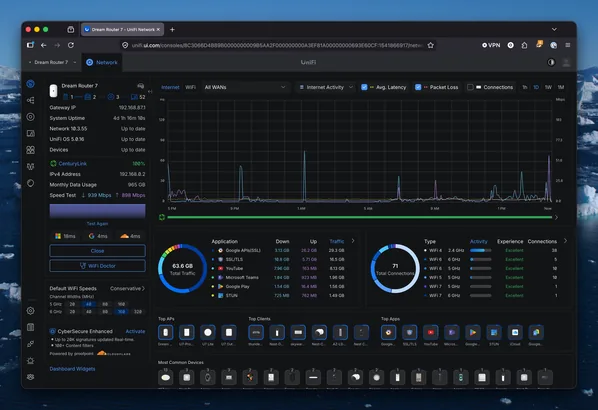
<p>The single best part (and the thing I find myself opening for no reason at all) is the dashboard. Every client, every access point, every flow, in one place. After years of a phone app that showed me a list of connected devices and a restart button, seeing the whole network laid out felt like flipping the lights on in a room I’d been walking through in the dark. Every smart-home gadget in the house is right there in the client list, and I can finally see exactly what each one is chatting to.</p>

<p><img src="/images/598/unifi_dashboard.webp" srcset="/images/293/unifi_dashboard.webp 293w, /images/598/unifi_dashboard.webp 598w, /images/976/unifi_dashboard.webp 976w, /images/1920/unifi_dashboard.webp 1920w" sizes="(max-width: 293px) 293px, (max-width: 598px) 598px, (max-width: 976px) 976px, 1920px" alt="UniFi controller dashboard" class="" loading="lazy" style="display:block; margin-left:auto; margin-right:auto" /></p>

<h3 id="the-gateway-dream-router-7">The gateway: Dream Router 7</h3>

<p>The heart of all this is the <a href="https://store.ui.com/us/en/category/cloud-gateways-wifi-integrated/products/udr7">Dream Router 7</a>. It’s a router, a firewall, the UniFi controller, and a Wi-Fi 7 access point in one box that sits on a shelf in my basement and quietly runs everything. For a house this size that all-in-one shape is exactly right. No rack, no separate controller appliance, no second machine to babysit. CenturyLink fiber comes into the house and the DR7 takes it from there.</p>

<p>Its Wi-Fi 7 radios aren’t sitting idle either. They’re part of the mesh, covering the basement themselves while the dedicated access points handle the rest of the house. If you want PoE built into the gateway, the Dream Machine SE is the step up, but for a small home that’s more box than I’ll ever fill.</p>

<h3 id="switches">Switches</h3>

<p>Three PoE switches handle everything wired, all in the basement. A <a href="https://store.ui.com/us/en/category/switching-utility/products/usw-lite-16-poe">USW Lite 16 PoE</a> is the workhorse, fanning out to the wired access points with a stack of ports to spare, which is the whole point. When I add a camera or another AP, I won’t have to think about where it plugs in.</p>

<p>Two <a href="https://store.ui.com/us/en/category/switching-utility/products/usw-lite-8-poe">USW Lite 8 PoE</a> switches pick up the rest. One tucks in right under the Dream Router and anchors the backbone; the other feeds a cluster of always-on gear, the kind of boxes that are happier on a cable than on Wi-Fi.</p>

<p>The reason they’re all PoE and not whatever was cheapest: power over ethernet means one cable does both jobs. An access point gets its data and its power from a single run, no wall wart, no hunting for an outlet behind the furniture. My wiring closet went from a tangle of little black power bricks to a few tidy ethernet runs. And the house’s original Cat 5e carries gigabit without complaint, so I didn’t rewire a thing, no matter what the internet insists you have to do.</p>

<h3 id="access-points">Access points</h3>

<p>The Dream Router covers the basement on its own, and four access points handle the rest of the house, all Wi-Fi 7, all placed where the network actually gets used rather than wherever happened to be convenient.</p>

<p>The workhorse is a <a href="https://store.ui.com/us/en/category/wifi-wall/products/u7-pro-wall">U7 Pro Wall</a> on the main floor, where the family spends most of the day. Despite the name, mine is not on a wall. A <a href="https://store.ui.com/us/en/category/accessories-access-point/collections/accessories-pro-ap-u7-pro-wall-mounts/products/uacc-u7-pro-wall-ts">table stand</a> accessory holds it upright on a shelf next to the TV, no drilling required, which kept the peace at home.</p>

<p>A <a href="https://store.ui.com/us/en/category/wifi-flagship/products/u7-lite">U7 Lite</a> lives on a bookshelf in the master bedroom. It’s Wi-Fi 7 at a fraction of the Pro’s price, and it’s plenty for a room that mostly streams to a TV and keeps a few phones alive overnight.</p>

<p>A <a href="https://store.ui.com/us/en/category/wifi-outdoor/products/u7-mesh">U7 Mesh</a> takes the guest bedroom and that side of the house. It’s a compact little thing, easy to place, and it means guests get a strong signal without me leaning on the bedroom AP to reach somewhere it was never meant to.</p>

<p>Outside, a <a href="https://store.ui.com/us/en/category/wifi-outdoor/products/u7-outdoor">U7 Outdoor</a> is mounted to the side of the house, facing the patio. It covers the back patio, holds onto the Sonos out there, and throws a strong signal into the garage so the EVs stay connected while they charge.</p>

<p>If there’s one trap to avoid, it’s the urge to keep adding access points and crank every radio to maximum, because the slider is right there and bigger numbers feel like they should be better. Resist it. A few APs at sensible power beat a pile of screaming ones, because the screaming ones make your phone ping-pong between them in the middle of a sentence. I spent more time choosing where things went than touching any actual settings, and that’s the part that paid off.</p>

<h3 id="a-month-in">A month in</h3>

<p>The short version: the flaky stuff is gone. My phone holds onto one access point as I walk the house instead of white-knuckling the first radio it grabbed at the front door. Calls don’t drop. I haven’t power-cycled anything, which after the old setup feels like a small miracle.</p>

<p>Setup was easier than the gear list makes it sound. You plug a device in, the controller spots it, you click adopt, give it a name, drag it onto the map, and you’re done. The defaults are sane. When I do want to change something, it’s usually where I’d expect to find it, and the settings I don’t recognize are at least labeled in plain English instead of a wall of acronyms.</p>

<p>I’ve already gone further than I expected to. There’s a dedicated IoT network now, walling off the smart-home devices from everything that matters, and real firewall rules to go with it, including region blocking so the network stops talking to corners of the internet it has no business in. There’s still a long list I haven’t gotten to: Teleport VPN for reaching home from the road, the Protect cameras everyone keeps telling me to buy, the travel router that follows you into hotel Wi-Fi. I’ll get to all of it. Probably sooner than my budget would prefer.</p>

<h3 id="the-full-list">The full list</h3>

<ul>
  <li><a href="https://store.ui.com/us/en/category/cloud-gateways-wifi-integrated/products/udr7">Dream Router 7</a> (gateway, firewall, controller, and Wi-Fi 7, all in one)</li>
  <li><a href="https://store.ui.com/us/en/category/switching-utility/products/usw-lite-16-poe">USW Lite 16 PoE</a> (main switch, feeds the wired APs)</li>
  <li><a href="https://store.ui.com/us/en/category/switching-utility/products/usw-lite-8-poe">USW Lite 8 PoE</a> x2 (one anchors the backbone, one for secondary wired gear)</li>
  <li><a href="https://store.ui.com/us/en/category/wifi-wall/products/u7-pro-wall">U7 Pro Wall</a> on a <a href="https://store.ui.com/us/en/category/accessories-access-point/collections/accessories-pro-ap-u7-pro-wall-mounts/products/uacc-u7-pro-wall-ts">table stand</a> (main floor)</li>
  <li><a href="https://store.ui.com/us/en/category/wifi-flagship/products/u7-lite">U7 Lite</a> (master bedroom, upper floor)</li>
  <li><a href="https://store.ui.com/us/en/category/wifi-outdoor/products/u7-mesh">U7 Mesh</a> (guest bedroom, main floor)</li>
  <li><a href="https://store.ui.com/us/en/category/wifi-outdoor/products/u7-outdoor">U7 Outdoor</a> (patio and garage)</li>
</ul>]]></content><author><name>Onyx</name></author><category term="homelab" /><summary type="html"><![CDATA[My old router and I had a good run. It was the Google Nest Wifi lineup, the friendly mesh kit you set up quickly with an app. I liked it enough to put it in my parents’ house, my sister’s, and my brother’s, and to recommend it to anyone who asked. For a couple of years I didn’t think about my own at all, which is the nicest thing you can say about a router.]]></summary></entry><entry><title type="html">Turning a Chappelle’s Show Joke Into a Real App (Thanks, AI)</title><link href="https://onyxmueller.net/2025/10/19/turning-a-chappelles-show-joke-into-a-real-app/" rel="alternate" type="text/html" title="Turning a Chappelle’s Show Joke Into a Real App (Thanks, AI)" /><published>2025-10-19T00:00:00-06:00</published><updated>2025-10-19T00:00:00-06:00</updated><id>https://onyxmueller.net/2025/10/19/turning-a-chappelles-show-joke-into-a-real-app</id><content type="html" xml:base="https://onyxmueller.net/2025/10/19/turning-a-chappelles-show-joke-into-a-real-app/"><![CDATA[<p>One of my favorite things about AI is how fast it collapses the gap between “wouldn’t that be funny” and “it’s live on the internet.”</p>

<p>I’m a big <a href="https://en.wikipedia.org/wiki/Dave_Chappelle">Dave Chappelle</a> fan. And an even bigger fan of <a href="https://en.wikipedia.org/wiki/Chappelle%27s_Show"><em>Chappelle’s Show</em></a>. For years I’ve wanted to build a digital version of the “Wrap It Up” box from <a href="https://youtu.be/j-emlb2_jdI?si=_0U4IfYrbZpLFax5">one of the show’s skits</a>. The gag riffs on a familiar award-show moment: a celebrity’s speech runs long, the orchestra starts playing, and they’re hustled off stage. The Chappelle version added a twist: a portable box you could pull out anywhere to shut someone down mid-sentence.</p>

<p>It lived in the “someday” pile for years. Fun concept, too many fiddly details to bother with on a weekend.</p>

<p>Then I just… built it. I described what I wanted to <a href="https://claude.com/product/overview">Claude</a> (faithful 3D recreation, interactive button, flashing text, audio) and we worked through the implementation together. 2D or 3D? How to handle audio? How to make it work on mobile? Questions that used to eat hours of searching became quick decisions.</p>

<p>The result: <strong><a href="https://wrapitupbox.com">WrapItUpBox.com</a></strong>, a fully functional, responsive web app.</p>

<p>The speed is what surprises me. The whole thing happened in hours. AI didn’t just write code; it helped me think through how to build the thing: trade-offs, constraints, approaches I wouldn’t have known to consider.</p>

<p>The ridiculous ideas I’d always shelved because they weren’t worth a week of my time? They’re worth an afternoon now.</p>

<p>And if that’s not worth doing… well, you know the line.</p>]]></content><author><name>Onyx</name></author><category term="build" /><category term="engineering" /><summary type="html"><![CDATA[One of my favorite things about AI is how fast it collapses the gap between “wouldn’t that be funny” and “it’s live on the internet.”]]></summary></entry><entry><title type="html">Why I Built a Now Page (and You Should Too)</title><link href="https://onyxmueller.net/2025/03/26/why-i-built-a-now-page/" rel="alternate" type="text/html" title="Why I Built a Now Page (and You Should Too)" /><published>2025-03-26T12:36:26-06:00</published><updated>2025-03-26T12:36:26-06:00</updated><id>https://onyxmueller.net/2025/03/26/why-i-built-a-now-page</id><content type="html" xml:base="https://onyxmueller.net/2025/03/26/why-i-built-a-now-page/"><![CDATA[<p>As my engineering team grew at work and became more globally distributed, I started running a <a href="https://www.merriam-webster.com/dictionary/fortnight">fortnightly</a> team meeting that brought everyone together. These meetings weren’t just about company updates or cascading information from leadership (though there was plenty of that). They also became a space to celebrate wins (both professional and personal), give shoutouts, and most importantly, connect as people.</p>

<p>One of my favorite segments was called <strong><em>“What is everybody consuming?”</em></strong> It was a simple idea: open the floor and invite folks to share what they were watching, reading, listening to, or otherwise enjoying in the moment. Movies, TV shows, music, books, podcasts, art - everything was fair game. And every time, it sparked fantastic dialogue. I learned so much about my team through that segment… what moved them, what made them laugh, what kept them up at night. It was a small thing that brought us closer.</p>

<p>Somewhere along the way, I thought: Maybe there’s others outside of work that are wondering what I’ve been consuming lately, too.</p>

<p>That’s what led me to build a Now page.</p>

<p>The concept of a Now page was originally introduced by <a href="https://sive.rs/">Derek Sivers</a>, and it’s a beautifully simple idea: a single page on your personal site that answers the question “What are you focused on right now?” It’s more dynamic than an About page, and more evergreen than a social feed. It’s a digital snapshot of what’s currently capturing your attention.</p>

<p>But there was one problem: <em>I’m lazy</em>.</p>

<p>I knew if I had to manually update my Now page every week or month, I’d probably forget, then feel guilty, then avoid it altogether. So I asked myself… <em>what if I could automate most of it, if not all of it?</em></p>

<p>That kicked off a fun little side project to make my Now page data-driven. The goal was to have it quietly update itself periodically in background, pulling in information from the places I already engage with media - no extra work required.</p>

<p>Here’s how I made it happen:</p>

<ul>
  <li>
    <p><strong>Books</strong>: I use <a href="https://hardcover.app/?referrer_id=27251">Hardcover</a>, a fantastic service for tracking your reading life. Using their <a href="https://docs.hardcover.app/api/getting-started/?referrer_id=27251">API</a>, I can fetch what I’m currently reading, along with the progress I’ve made. The API is clean and well-documented, and I love supporting an indie, book-loving alternative to Goodreads.</p>
  </li>
  <li>
    <p><strong>Music</strong>: <a href="https://developer.spotify.com/documentation/web-api">Spotify’s API</a> gave me access to my most frequently played tracks and artists over the past few weeks. I pull the results from the Top Tracks endpoint, and surface them as a snapshot of what’s been on repeat lately.</p>
  </li>
  <li>
    <p><strong>TV &amp; Movies</strong>: I host most of my media on a self-hosted <a href="https://www.plex.tv/">Plex</a> server, and luckily, Plex provides a local API to access viewing history. With a little digging (and some reverse engineering), I was able to pull recently watched content and surface it automatically. If I watched it, it shows up - simple as that.</p>
  </li>
</ul>

<p>The result is a living, breathing Now page that reflects what I’m actually consuming across books, music, and movies/shows in near real time. No guilt. No manual updates. Just vibes.</p>

<p>I really like how it turned out. And more importantly, I love the spirit behind it… sharing a little slice of life in a way that’s honest, human, and maybe even inspiring to someone else.</p>

<p>So if we’re friends (or even if we’re not), and you ever find yourself wondering what I’ve been into lately, check out my <a href="/now">Now page</a>. Better yet, make your own. I promise, it’s worth it.</p>]]></content><author><name>Onyx</name></author><category term="meta" /><summary type="html"><![CDATA[As my engineering team grew at work and became more globally distributed, I started running a fortnightly team meeting that brought everyone together. These meetings weren’t just about company updates or cascading information from leadership (though there was plenty of that). They also became a space to celebrate wins (both professional and personal), give shoutouts, and most importantly, connect as people.]]></summary></entry><entry><title type="html">Culture is a Superpower</title><link href="https://onyxmueller.net/2025/02/05/culture-is-a-superpower/" rel="alternate" type="text/html" title="Culture is a Superpower" /><published>2025-02-05T09:41:26-07:00</published><updated>2025-02-05T09:41:26-07:00</updated><id>https://onyxmueller.net/2025/02/05/culture-is-a-superpower</id><content type="html" xml:base="https://onyxmueller.net/2025/02/05/culture-is-a-superpower/"><![CDATA[<p>What separates a good company from a great one? It’s not just the product, the strategy, or even the talent. It’s the culture. Culture is the unseen force that shapes how people work together, how they innovate, and ultimately, how they succeed. It’s a company’s or leader’s superpower. It amplifies the impact of its people and unlocks potential far beyond what any individual could achieve alone.</p>

<h3 id="more-than-just-a-paycheck">More Than Just a Paycheck</h3>

<p>I’ve been lucky enough to be part of delivering 10 March Madness tournaments to millions of fans - many of them wildly successful (as evidenced by <a href="https://www.nyemmys.org/articles/39th-annual-sports-emmy-awards-announcement/">winning one Sports Emmy</a> and several nominations). I attribute much of that success to being in a thriving culture that allowed teams to work really well together and people to do amazing work. It wasn’t just about executing a massive event; it was about being part of an environment that fostered collaboration, trust, and innovation. That culture was the foundation that enabled us to meet challenges, push boundaries, and create unforgettable experiences.</p>

<p>We all want to be part of something inspiring. Work is more than just a series of tasks or a paycheck. It’s a significant part of our lives. The best workplaces understand this and cultivate an environment where people feel connected to a purpose bigger than themselves. When employees believe in the mission and feel valued, their engagement, creativity, and commitment soar. They’re not just showing up to do a job; they’re invested in making a difference.</p>

<h3 id="culture-is-the-os">Culture is the OS</h3>

<p>Think of culture as a company’s operating system. It’s both the visible and invisible wiring that connects people, guiding them with a shared sense of purpose, clarity, motivation, and focus. It influences how decisions are made, how teams collaborate, and how challenges are tackled. A strong culture doesn’t happen by accident. It is intentionally built and maintained, ensuring that everyone is aligned and empowered to do their best work.</p>

<h3 id="a-force-multiplier">A Force Multiplier</h3>

<p>A great culture doesn’t just support a company’s success; it amplifies it. It’s a force multiplier, elevating individual capabilities and enhancing team performance. In an environment where trust, collaboration, and innovation thrive, people push boundaries, take smart risks, and create extraordinary work. Culture sets the conditions for success. Not just for today, but for sustained excellence over time.</p>

<h3 id="building-a-superpower">Building a Superpower</h3>

<p>So how do you cultivate a culture that becomes a superpower? It starts with leadership that prioritizes clarity, inclusion, and a shared vision. It requires trust and psychological safety, where people feel empowered to contribute their best ideas. It thrives on transparency, communication, and a deep commitment to continuous improvement.</p>

<p>Companies that embrace culture as their superpower don’t just attract top talent. They retain and elevate them. They create workplaces that people are proud to be a part of, where purpose drives performance, and where the impact of their work extends far beyond the walls of the office.</p>

<p>Culture isn’t a perk or an afterthought. It’s the foundation of greatness. When done right, it’s the difference between a company that merely operates and one that truly thrives.</p>]]></content><author><name>Onyx</name></author><category term="leadership" /><summary type="html"><![CDATA[What separates a good company from a great one? It’s not just the product, the strategy, or even the talent. It’s the culture. Culture is the unseen force that shapes how people work together, how they innovate, and ultimately, how they succeed. It’s a company’s or leader’s superpower. It amplifies the impact of its people and unlocks potential far beyond what any individual could achieve alone.]]></summary></entry><entry><title type="html">We Are All Creators</title><link href="https://onyxmueller.net/2025/02/02/we-are-all-creators/" rel="alternate" type="text/html" title="We Are All Creators" /><published>2025-02-02T00:00:00-07:00</published><updated>2025-02-02T00:00:00-07:00</updated><id>https://onyxmueller.net/2025/02/02/we-are-all-creators</id><content type="html" xml:base="https://onyxmueller.net/2025/02/02/we-are-all-creators/"><![CDATA[<p>I <em>try</em> to read as many books as I can. Finding the time can be challenging, but I always make an effort. One of my favorite reads of last year was <strong>The Creative Act: A Way of Being</strong> by <a href="https://en.wikipedia.org/wiki/Rick_Rubin">Rick Rubin</a>. It’s a book that deeply resonated with me, filled with lots of lessons and thought-provoking concepts on creativity and the process. I would highly recommend it to anyone interested! You can grab a copy <a href="https://amzn.to/4g068CB">here</a>.</p>

<p>Early in the book, Rubin delves into an idea that I’ve reflected on for years: that everyone is inherently creative.</p>

<blockquote>
  <p><em style="display:block; margin-left:2em; margin-right:2em">Creativity is not a rare ability. It is not difficult to access. Creativity is a fundamental aspect of being human. It’s our birthright. And it’s for all of us. Creativity doesn’t exclusively relate to making art. We all engage in this act on a daily basis. To create is to bring something into existence that wasn’t there before.</em></p>
</blockquote>

<p>This concept shifts how we think about creativity. It’s not something reserved for artists, musicians, influencers, YouTubers, or for magical moments of inspiration… but as a natural part of life. It’s everywhere, even in the small, everyday things we do. For example:</p>

<ul>
  <li>
    <p><strong>Parenting</strong>: Parenting is a constant exercise in improvisation. I’m always amazed by how my wife navigates challenges with our kids, whether it’s problem-solving, inventing fun activities, or managing tantrums. It’s all creativity in action.</p>
  </li>
  <li>
    <p><strong>Cooking</strong>: While recipes can guide us, there’s often room for adaptation and experimentation. Finding joy in this process is a creative endeavor.</p>
  </li>
  <li>
    <p><strong>Conversations</strong>: Whether it’s telling a story, offering advice, or making someone laugh, creativity plays a role in how we connect with others.</p>
  </li>
  <li>
    <p><strong>Navigating Your Day</strong>: The way you organize your time, space, or even the choices you make on your commute can be an act of creativity.</p>
  </li>
  <li>
    <p><strong>Humor</strong>: Life throws us curveballs. Finding something funny in life’s challenges is such a creative response. It takes perspective and imagination.</p>
  </li>
</ul>

<p>Rubin’s message is a great reminder that creativity isn’t just about making art. It’s about how we approach life… how we approach challenges, improve routines, connect with others, and make everyday decisions. By recognizing creativity in the ordinary, we can uncover beauty and possibility in unexpected places.</p>

<p>We are <em>all</em> creators.</p>]]></content><author><name>Onyx</name></author><category term="leadership" /><summary type="html"><![CDATA[I try to read as many books as I can. Finding the time can be challenging, but I always make an effort. One of my favorite reads of last year was The Creative Act: A Way of Being by Rick Rubin. It’s a book that deeply resonated with me, filled with lots of lessons and thought-provoking concepts on creativity and the process. I would highly recommend it to anyone interested! You can grab a copy here.]]></summary></entry><entry><title type="html">How I Silenced My Noisy Intel NUC</title><link href="https://onyxmueller.net/2025/02/01/how-i-silenced-my-noisy-intel-nuc/" rel="alternate" type="text/html" title="How I Silenced My Noisy Intel NUC" /><published>2025-02-01T17:00:00-07:00</published><updated>2025-02-01T17:00:00-07:00</updated><id>https://onyxmueller.net/2025/02/01/how-i-silenced-my-noisy-intel-nuc</id><content type="html" xml:base="https://onyxmueller.net/2025/02/01/how-i-silenced-my-noisy-intel-nuc/"><![CDATA[<p>I’ve been using an Intel NUC as a new home automation server on my home network. For such a compact machine, it’s been surprisingly loud! Even when idle, the fan noise was constant and more noticeable than I expected.</p>

<p>I’ve dealt with fan noise before on Windows using <a href="https://getfancontrol.com/">Fan Control</a>, which lets you adjust fan speeds based on CPU and motherboard temperature sensors. But unfortunately that was not usable since server OS is Linux-based. Moreover, Intel NUCs don’t have software-controllable fans.</p>

<h3 id="bios-to-the-rescue">BIOS to the Rescue</h3>

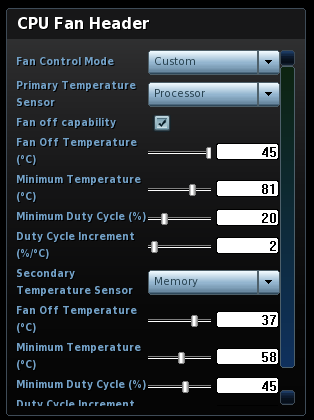
<p>After some research, I found that the NUC’s BIOS actually has a pretty robust <a href="https://www.intel.com/content/www/us/en/support/articles/000005946/intel-nuc.html">set of cooling controls</a>.</p>

<p><img src="/images/598/intel_nuc_bios_cooling.jpg" srcset="/images/293/intel_nuc_bios_cooling.jpg 293w, /images/598/intel_nuc_bios_cooling.jpg 598w, /images/976/intel_nuc_bios_cooling.jpg 976w, /images/1920/intel_nuc_bios_cooling.jpg 1920w" sizes="(max-width: 293px) 293px, (max-width: 598px) 598px, (max-width: 976px) 976px, 1920px" alt="Intel NUC BIOS Cooling" class="" loading="lazy" style="display:block; margin-left:auto; margin-right:auto" /></p>

<p>With a bit of tweaking, I was able to dramatically reduce the noise without sacrificing stability. Here’s what worked for me:</p>

<ul>
  <li>
    <p>Set the <strong>Fan Control Mode</strong> to “Custom” – This allowed me to fine-tune the cooling settings instead of relying on Intel’s defaults.</p>
  </li>
  <li>
    <p>Lowered the <strong>Minimum Duty Cycle</strong> to 20% – By reducing the idle fan speed, the NUC became significantly quieter when not under load.</p>
  </li>
  <li>
    <p>Disabled <strong>Turbo Boost</strong> – Since this machine doesn’t need high performance, turning off Turbo Boost kept the CPU cooler and prevented unnecessary fan ramp-ups.</p>
  </li>
  <li>
    <p>Switched the <strong>Power Management State</strong> to “Low Power” – I’m not 100% sure what this setting tweaks under the hood, but given this machine’s role, prioritizing efficiency made sense.</p>
  </li>
</ul>

<h3 id="the-results">The Results</h3>

<p>After applying these changes and rebooting, the NUC was MUCH quieter. If you’ve got a noisy Intel NUC driving you crazy, diving into the BIOS settings might be all it takes to quiet it down.</p>]]></content><author><name>Onyx</name></author><category term="homelab" /><summary type="html"><![CDATA[I’ve been using an Intel NUC as a new home automation server on my home network. For such a compact machine, it’s been surprisingly loud! Even when idle, the fan noise was constant and more noticeable than I expected.]]></summary></entry><entry><title type="html">Introducing the Pinata Android Library</title><link href="https://onyxmueller.net/2024/12/16/introducing-the-pinata-android-library/" rel="alternate" type="text/html" title="Introducing the Pinata Android Library" /><published>2024-12-16T00:00:00-07:00</published><updated>2024-12-16T00:00:00-07:00</updated><id>https://onyxmueller.net/2024/12/16/introducing-the-pinata-library-for-android</id><content type="html" xml:base="https://onyxmueller.net/2024/12/16/introducing-the-pinata-android-library/"><![CDATA[<p>I’m excited to announce the release of a new library: Pinata for Android! This library is designed to simplify your integration with <a href="https://pinata.cloud/">Pinata’s platform</a>, providing an efficient way to interact with its APIs directly in your Android/Kotlin apps.</p>

<h3 id="why-build-this-library">Why Build This Library?</h3>

<p>After developing the <a href="https://onyxmueller.net/2024/11/19/introducing-the-pinata-ruby-library/">Pinata Ruby Library</a> to enhance backend workflows, I realized the mobile community could benefit from a similar tool. Whether you’re managing file uploads, retrieving metadata, or integrating with Pinata’s infrastructure, this library provides the tools you need.</p>

<p>Android developers can now avoid the hassle of tedious API calls. The Pinata Android Library offers clean abstractions and a modern API design, specifically tailored for Kotlin and Java projects.</p>

<h3 id="key-features">Key Features</h3>

<ul>
  <li>
    <p>Simplified Integration: Get started with just a few lines of code.</p>
  </li>
  <li>
    <p>API Coverage: Focused on the Files API for seamless file uploads, retrievals, and metadata management.</p>
  </li>
  <li>
    <p>Kotlin-first Design: Built with Kotlin, ensuring modern language features and interoperability with Java.</p>
  </li>
  <li>
    <p>Open Source: Fully open-source, for transparency and collaboration.</p>
  </li>
</ul>

<h3 id="getting-started">Getting Started</h3>

<p>Adding the library to your Android project is straightforward. Head over to the <a href="https://github.com/onyxmueller/pinata-android">GitHub repository</a> for installation instructions, detailed documentation, and code samples.</p>

<p>Here’s a quick example to showcase how easy it is to upload a file:</p>

<pre><code class="language-Kotlin">val pinataClient = PinataClient.get(YOUR_PINATA_JWT_TOKEN, YOUR_PINATA_GATEWAY)
val result = pinataClient.files.upload(file)
result.onSuccess { response -&gt;
    println("File CID: ${response.cid}")
}
</code></pre>

<h3 id="try-it-out">Try It Out</h3>

<p>This library aims to make Pinata’s API more accessible to mobile, providing Kotlin-friendly extensions and abstractions for Android developers. Currently, the library supports the Files API, but will continue to evolve to support more of Pinata’s functionality over time.</p>

<p>For full documentation, visit the GitHub repository: <a href="https://github.com/onyxmueller/pinata-android">Pinata Android on GitHub</a>. To learn more about the Files API, refer to the official <a href="https://docs.pinata.cloud/api-reference">Pinata API docs</a>.</p>

<p>I hope you find this library useful for your projects! Contributions are always welcome!</p>]]></content><author><name>Onyx</name></author><category term="build" /><category term="engineering" /><summary type="html"><![CDATA[I’m excited to announce the release of a new library: Pinata for Android! This library is designed to simplify your integration with Pinata’s platform, providing an efficient way to interact with its APIs directly in your Android/Kotlin apps.]]></summary></entry><entry><title type="html">Introducing the Pinata Ruby Library: Unlocking the Power of Pinata’s Files API</title><link href="https://onyxmueller.net/2024/11/19/introducing-the-pinata-ruby-library/" rel="alternate" type="text/html" title="Introducing the Pinata Ruby Library: Unlocking the Power of Pinata’s Files API" /><published>2024-11-19T00:00:00-07:00</published><updated>2024-11-19T00:00:00-07:00</updated><id>https://onyxmueller.net/2024/11/19/introducing-the-pinata-ruby-library</id><content type="html" xml:base="https://onyxmueller.net/2024/11/19/introducing-the-pinata-ruby-library/"><![CDATA[<p>When developers need a file storage solution, AWS S3 is often the first option. However, AWS S3 can be expensive, complex, and often overkill for many projects. Enter <a href="https://pinata.cloud/">Pinata</a>, which offers a modern alternative: a straightforward Files API designed to simplify how developers manage file storage without breaking the bank.</p>

<h3 id="what-makes-pinatas-files-api-special">What Makes Pinata’s Files API Special?</h3>

<p>Pinata’s Files API is a centralized storage solution designed to complement its decentralized IPFS offerings. It provides developers with:</p>

<ul>
  <li>
    <p><strong>Simple File Storage</strong>: Upload, organize, and access files with a clean and powerful API.</p>
  </li>
  <li>
    <p><strong>Cost Efficiency</strong>: Affordable plans that scale with your needs.</p>
  </li>
  <li>
    <p><strong>Fast Integration</strong>: No need to wrestle with complex configurations. The Files API is designed for immediate usability.</p>
  </li>
  <li>
    <p><strong>Data Redundancy and Security</strong>: Your files are stored securely with built-in redundancy for reliability.</p>
  </li>
</ul>

<p>The Files API is ideal for developers who need traditional storage capabilities but with the developer-friendly ethos Pinata is known for.</p>

<h3 id="a-ruby-solution-for-pinatas-files-api">A Ruby Solution for Pinata’s Files API</h3>

<p>Pinata’s Files API is an incredible tool, but until now, Ruby developers lacked a dedicated library for leveraging its features. To address this gap, I’ve developed an open-source Ruby gem: <a href="https://github.com/onyxmueller/pinata-ruby">Pinata Ruby</a>.</p>

<p>This gem provides an elegant and intuitive way to interact with the Files API, enabling Ruby developers to upload, retrieve, and update their files effortlessly.</p>

<h3 id="getting-started-with-the-pinata-ruby-library">Getting Started with the Pinata Ruby Library</h3>

<h4 id="installation">Installation</h4>

<p>To install the gem, add it to your Gemfile:</p>

<pre><code class="language-Ruby">gem 'pinata', '~&gt; 1.0'
</code></pre>

<p>Then run <code class="language-plaintext highlighter-rouge">bundle</code> to complete the installation.</p>

<h4 id="configuration">Configuration</h4>

<p>Create your Pinata client with your Pinata API key:</p>

<div class="language-ruby highlighter-rouge"><div class="highlight"><pre class="highlight"><code><span class="nb">require</span> <span class="s1">'pinata'</span>

<span class="n">client</span> <span class="o">=</span> <span class="no">Pinata</span><span class="o">::</span><span class="no">Client</span><span class="p">.</span><span class="nf">new</span><span class="p">(</span><span class="ss">jwt_key: </span><span class="s1">'your_api_jwt_key'</span><span class="p">)</span>
</code></pre></div></div>

<h4 id="authentication">Authentication</h4>

<p>Test your ability to connect to the Pinata API with the key:</p>

<div class="language-ruby highlighter-rouge"><div class="highlight"><pre class="highlight"><code><span class="n">client</span><span class="p">.</span><span class="nf">authentication</span><span class="p">.</span><span class="nf">test</span>
</code></pre></div></div>

<h4 id="uploading-a-file">Uploading a File</h4>

<p>Uploading a file is as simple as:</p>

<div class="language-ruby highlighter-rouge"><div class="highlight"><pre class="highlight"><code><span class="n">result</span> <span class="o">=</span> <span class="n">client</span><span class="p">.</span><span class="nf">files</span><span class="p">.</span><span class="nf">upload_file</span><span class="p">(</span><span class="ss">file: </span><span class="s1">'/path/to/your/file'</span><span class="p">)</span>
<span class="nb">puts</span> <span class="s2">"File stored with CID: </span><span class="si">#{</span><span class="n">result</span><span class="p">.</span><span class="nf">cid</span><span class="si">}</span><span class="s2">"</span>
</code></pre></div></div>

<h4 id="listing-files">Listing Files</h4>

<p>Access your stored files easily:</p>

<div class="language-ruby highlighter-rouge"><div class="highlight"><pre class="highlight"><code><span class="n">files</span> <span class="o">=</span> <span class="n">client</span><span class="p">.</span><span class="nf">files</span><span class="p">.</span><span class="nf">list</span>
<span class="nb">puts</span> <span class="s2">"Total # of files: </span><span class="si">#{</span><span class="n">files</span><span class="p">.</span><span class="nf">data</span><span class="p">.</span><span class="nf">size</span><span class="si">}</span><span class="s2">"</span>  
</code></pre></div></div>

<h4 id="updating-file-name-or-metadata">Updating File Name or Metadata</h4>

<p>The gem also includes methods to update or delete files and folders:</p>

<div class="language-ruby highlighter-rouge"><div class="highlight"><pre class="highlight"><code><span class="n">result</span> <span class="o">=</span> <span class="n">client</span><span class="p">.</span><span class="nf">files</span><span class="p">.</span><span class="nf">update</span><span class="p">(</span><span class="ss">file_id: </span><span class="s2">"the_file_id"</span><span class="p">,</span> <span class="s2">"name"</span><span class="p">:</span> <span class="s2">"new_name_of_file"</span><span class="p">)</span>
<span class="nb">puts</span> <span class="s2">"New name of file: </span><span class="si">#{</span><span class="n">result</span><span class="p">.</span><span class="nf">name</span><span class="si">}</span><span class="s2">"</span>  
</code></pre></div></div>

<h3 id="try-it-out">Try It Out</h3>

<p>This library aims to make Pinata’s Files API more accessible to Ruby developers, saving time and effort while promoting scalable file storage solutions. It will grow to support more functionality provided by the API over time.</p>

<p>For full documentation, visit the GitHub repository: <a href="https://github.com/onyxmueller/pinata-ruby">Pinata Ruby on GitHub</a>. To understand more about the Files API, check out the official <a href="https://docs.pinata.cloud/api-reference">Pinata API docs</a>.</p>

<p>Take your file storage to the next level with Pinata Ruby. Try it out, and build something amazing!</p>]]></content><author><name>Onyx</name></author><category term="build" /><category term="engineering" /><summary type="html"><![CDATA[When developers need a file storage solution, AWS S3 is often the first option. However, AWS S3 can be expensive, complex, and often overkill for many projects. Enter Pinata, which offers a modern alternative: a straightforward Files API designed to simplify how developers manage file storage without breaking the bank.]]></summary></entry><entry><title type="html">Dynamic DNS Using Gandi</title><link href="https://onyxmueller.net/2024/05/12/dynamic-dns-using-gandi/" rel="alternate" type="text/html" title="Dynamic DNS Using Gandi" /><published>2024-05-12T00:00:00-06:00</published><updated>2024-05-12T00:00:00-06:00</updated><id>https://onyxmueller.net/2024/05/12/dynamic-dns-using-gandi</id><content type="html" xml:base="https://onyxmueller.net/2024/05/12/dynamic-dns-using-gandi/"><![CDATA[<p>The more I tinker with technology and build, the more I rely on my home servers &amp; services to be up and accessible. So, I never want them to be unaccessible just because my IP address changed. The typical way to address this is with a Dynamic DNS (DDNS) solution. But if <a href="https://gandi.net">Gandi</a> is your DNS registrar, setting up your own solution is pretty simple.</p>

<h3 id="gandis-livedns-api-and-personal-access-token">Gandi’s LiveDNS API And Personal Access Token</h3>

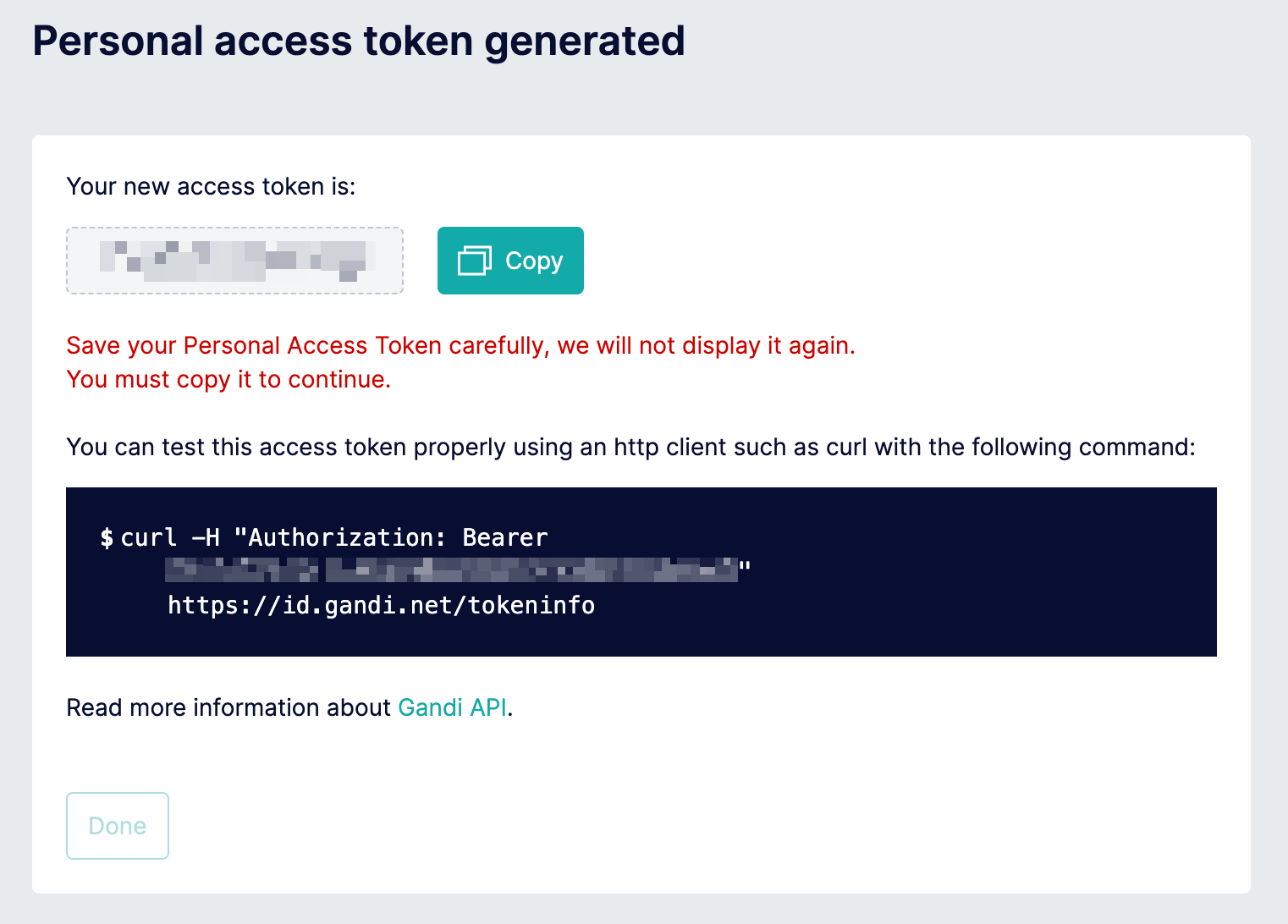
<p>Gandi provides a range of <a href="https://api.gandi.net/docs/reference/">APIs</a> for customer use, including the powerful <a href="https://api.gandi.net/docs/livedns/">LiveDNS API</a> that enables users to update their DNS records dynamically. To access these APIs, all you need to do is generate a <a href="https://api.gandi.net/docs/authentication/">Personal Access Token</a>. You can generate one from your account security page:</p>

<ul>
  <li>
    <p>After logging in, click the down arrow next to your username in the top right corner.</p>
  </li>
  <li>
    <p>Select “User Settings”.</p>
  </li>
  <li>
    <p>Scroll down to “Personal Access Token (PAT)” and select “Create a token”.</p>
  </li>
  <li>
    <p>Choose your organization.</p>
  </li>
  <li>
    <p>Enter a token name, give it an expiration date, and scroll down to “Domains” to check “Manage domain name technical configurations”. Click “Create”.</p>
  </li>
</ul>

<p>You should see a screen similar to the following.</p>

<p><img src="/images/976/gandi_personal_access_token.png" alt="Gandi Personal Access Token" class="center-block" /></p>

<p>Once you’ve secured your new Personal Access Token, you can use it in your scripts, like the one below.</p>

<h3 id="implementation-using-ruby">Implementation Using Ruby</h3>

<p>Here’s a Ruby script that serves a specific purpose - it uses Gandi’s <a href="https://api.gandi.net/docs/livedns/">LiveDNS API</a> to determine the current IP address and update DNS. This script is a straightforward implementation of the API.</p>

<figure class="highlight"><pre><code class="language-ruby" data-lang="ruby"><span class="c1">#!/usr/bin/env ruby</span>

<span class="n">gandi_token</span> <span class="o">=</span> <span class="s2">"REPLACE_ME_WITH_YOUR_GANDI_TOKEN"</span>
<span class="n">gandi_domain</span> <span class="o">=</span> <span class="s2">"REPLACE_ME_WITH_YOUR_GANDI_DOMAIN"</span>
<span class="n">gandi_subdomain</span> <span class="o">=</span> <span class="s2">"REPLACE_ME_WITH_YOUR_GANDI_SUBDOMAIN"</span>

<span class="c1"># Get external IP address</span>
<span class="n">external_ip</span> <span class="o">=</span> <span class="sb">`curl -s ifconfig.me`</span>

<span class="c1"># Update the A record of the subdomain using a PUT request to Gandi's LiveDNS API</span>
<span class="n">livedns_endpoint</span> <span class="o">=</span> <span class="s2">"https://api.gandi.net/v5/livedns/domains/</span><span class="si">#{</span><span class="n">gandi_domain</span><span class="si">}</span><span class="s2">/records/</span><span class="si">#{</span><span class="n">gandi_subdomain</span><span class="si">}</span><span class="s2">/A"</span>
<span class="n">cmd</span> <span class="o">=</span> <span class="s2">"curl --silent --fail -X PUT -H 'Content-Type: application/json' -H 'Authorization: Bearer </span><span class="si">#{</span><span class="n">gandi_token</span><span class="si">}</span><span class="s2">' -d '{</span><span class="se">\"</span><span class="s2">rrset_ttl</span><span class="se">\"</span><span class="s2">: 1200, </span><span class="se">\"</span><span class="s2">rrset_values</span><span class="se">\"</span><span class="s2">: [</span><span class="se">\"</span><span class="si">#{</span><span class="n">external_ip</span><span class="si">}</span><span class="se">\"</span><span class="s2">]}' </span><span class="si">#{</span><span class="n">livedns_endpoint</span><span class="si">}</span><span class="s2">"</span>
<span class="n">output</span> <span class="o">=</span> <span class="sb">`</span><span class="si">#{</span><span class="n">cmd</span><span class="si">}</span><span class="sb">`</span>

<span class="c1"># Check exit code</span>
<span class="k">if</span> <span class="vg">$?</span><span class="p">.</span><span class="nf">exitstatus</span> <span class="o">!=</span> <span class="mi">0</span>
  <span class="nb">puts</span> <span class="s2">"ERROR: Gandi DNS update failed. Exit code </span><span class="si">#{</span><span class="vg">$?</span><span class="p">.</span><span class="nf">exitstatus</span><span class="si">}</span><span class="s2">."</span>
  <span class="nb">exit</span> <span class="mi">1</span>
<span class="k">end</span></code></pre></figure>

<p>What is happening here? To start, the script relies on some variable assignments, including the aforementioned Gandi Person Access Token. Then it retrieves the public IP address from <a href="https://ifconfig.me">ifconfig.me</a>, a free service operated by IPinfo. With that, it then attempts to update the ‘A’ DNS record for the subdomain using the LiveDNS API. If the execution goes well, no errors should be reported.</p>

<h3 id="running-the-script">Running The Script</h3>

<p>Finally, the script should run periodically since we want to counter unpredictable IP changes. A 30-minute interval makes for a reasonable balance between API consumption and non-commercial service availability. We can declare such a job using the guidance I provided in my <a href="https://onyxmueller.net/2018/08/31/scheduling-commands-with-cron-on-your-mac/">Scheduling Commands With Cron On Your Mac</a> post.</p>]]></content><author><name>Onyx</name></author><category term="homelab" /><summary type="html"><![CDATA[The more I tinker with technology and build, the more I rely on my home servers &amp; services to be up and accessible. So, I never want them to be unaccessible just because my IP address changed. The typical way to address this is with a Dynamic DNS (DDNS) solution. But if Gandi is your DNS registrar, setting up your own solution is pretty simple.]]></summary></entry></feed>