May 31, 2026
UniFi-ed
My old router and I had a good run. It was the Google Nest Wifi lineup, the friendly mesh kit you set up quickly with an app. I liked it enough to put it in my parents’ house, my sister’s, and my brother’s, and to recommend it to anyone who asked. For a couple of years I didn’t think about my own at all, which is the nicest thing you can say about a router.
Then the mysteries started happening.
Devices would drop and reconnect for no reason I could find. The mesh point in the garage lost its backhaul about once a week and needed a power cycle to come back to life. A video call would stutter, I’d open the app to look, and by the time it loaded the problem had cleared on its own. Nothing I could reproduce, nothing the diagnostics would admit to, and no real way to see what was actually happening. A consumer router tells you the Wi-Fi is “good.” It will not tell you why your laptop just decided to talk to the point two rooms away.
So I did the calm, proportionate thing and rebuilt the entire network on UniFi.
If you haven’t fallen down this particular hole, UniFi is Ubiquiti’s line of prosumer networking gear: gateways, switches, access points, cameras, the works, all managed from a single console. You buy the hardware once and the software is free for as long as you own the device. No subscription, no feature held hostage behind a monthly tier. VLANs, guest networks, firewall rules, intrusion detection, Wi-Fi schedules: all standard, all free. The Nest Wifi wasn’t hiding these settings from me. It just didn’t have them. You got a guest network and a button to pause the kids’ devices at dinner, and that was about the extent of the control on offer.
The part that actually sold me is that you grow into it. Start with a gateway, add a switch when you run out of ports, add an access point when you run out of coverage, and the controller ties the whole thing together as you go. You don’t tear everything out to gain one feature. Fair warning, though: buying this stuff is addictive. The catalog is deep, the hardware is genuinely nice to hold, and there is always one more box that would make the setup a little better. Ask me how I know. Just don’t tell my wife.
The single best part (and the thing I find myself opening for no reason at all) is the dashboard. Every client, every access point, every flow, in one place. After years of a phone app that showed me a list of connected devices and a restart button, seeing the whole network laid out felt like flipping the lights on in a room I’d been walking through in the dark. Every smart-home gadget in the house is right there in the client list, and I can finally see exactly what each one is chatting to.
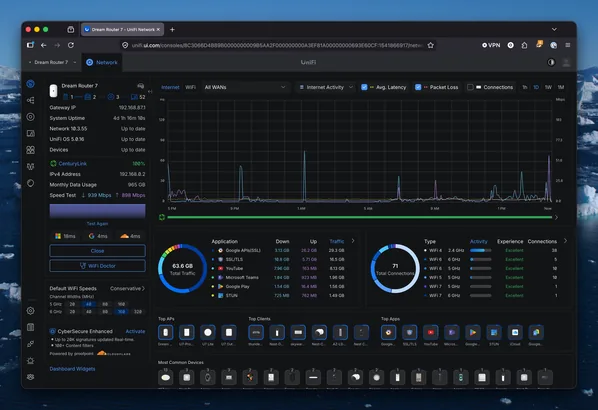
The gateway: Dream Router 7
The heart of all this is the Dream Router 7. It’s a router, a firewall, the UniFi controller, and a Wi-Fi 7 access point in one box that sits on a shelf in my basement and quietly runs everything. For a house this size that all-in-one shape is exactly right. No rack, no separate controller appliance, no second machine to babysit. CenturyLink fiber comes into the house and the DR7 takes it from there.
Its Wi-Fi 7 radios aren’t sitting idle either. They’re part of the mesh, covering the basement themselves while the dedicated access points handle the rest of the house. If you want PoE built into the gateway, the Dream Machine SE is the step up, but for a small home that’s more box than I’ll ever fill.
Switches
Three PoE switches handle everything wired, all in the basement. A USW Lite 16 PoE is the workhorse, fanning out to the wired access points with a stack of ports to spare, which is the whole point. When I add a camera or another AP, I won’t have to think about where it plugs in.
Two USW Lite 8 PoE switches pick up the rest. One tucks in right under the Dream Router and anchors the backbone; the other feeds a cluster of always-on gear, the kind of boxes that are happier on a cable than on Wi-Fi.
The reason they’re all PoE and not whatever was cheapest: power over ethernet means one cable does both jobs. An access point gets its data and its power from a single run, no wall wart, no hunting for an outlet behind the furniture. My wiring closet went from a tangle of little black power bricks to a few tidy ethernet runs. And the house’s original Cat 5e carries gigabit without complaint, so I didn’t rewire a thing, no matter what the internet insists you have to do.
Access points
The Dream Router covers the basement on its own, and four access points handle the rest of the house, all Wi-Fi 7, all placed where the network actually gets used rather than wherever happened to be convenient.
The workhorse is a U7 Pro Wall on the main floor, where the family spends most of the day. Despite the name, mine is not on a wall. A table stand accessory holds it upright on a shelf next to the TV, no drilling required, which kept the peace at home.
A U7 Lite lives on a bookshelf in the master bedroom. It’s Wi-Fi 7 at a fraction of the Pro’s price, and it’s plenty for a room that mostly streams to a TV and keeps a few phones alive overnight.
A U7 Mesh takes the guest bedroom and that side of the house. It’s a compact little thing, easy to place, and it means guests get a strong signal without me leaning on the bedroom AP to reach somewhere it was never meant to.
Outside, a U7 Outdoor is mounted to the side of the house, facing the patio. It covers the back patio, holds onto the Sonos out there, and throws a strong signal into the garage so the EVs stay connected while they charge.
If there’s one trap to avoid, it’s the urge to keep adding access points and crank every radio to maximum, because the slider is right there and bigger numbers feel like they should be better. Resist it. A few APs at sensible power beat a pile of screaming ones, because the screaming ones make your phone ping-pong between them in the middle of a sentence. I spent more time choosing where things went than touching any actual settings, and that’s the part that paid off.
A month in
The short version: the flaky stuff is gone. My phone holds onto one access point as I walk the house instead of white-knuckling the first radio it grabbed at the front door. Calls don’t drop. I haven’t power-cycled anything, which after the old setup feels like a small miracle.
Setup was easier than the gear list makes it sound. You plug a device in, the controller spots it, you click adopt, give it a name, drag it onto the map, and you’re done. The defaults are sane. When I do want to change something, it’s usually where I’d expect to find it, and the settings I don’t recognize are at least labeled in plain English instead of a wall of acronyms.
I’ve already gone further than I expected to. There’s a dedicated IoT network now, walling off the smart-home devices from everything that matters, and real firewall rules to go with it, including region blocking so the network stops talking to corners of the internet it has no business in. There’s still a long list I haven’t gotten to: Teleport VPN for reaching home from the road, the Protect cameras everyone keeps telling me to buy, the travel router that follows you into hotel Wi-Fi. I’ll get to all of it. Probably sooner than my budget would prefer.
The full list
- Dream Router 7 (gateway, firewall, controller, and Wi-Fi 7, all in one)
- USW Lite 16 PoE (main switch, feeds the wired APs)
- USW Lite 8 PoE x2 (one anchors the backbone, one for secondary wired gear)
- U7 Pro Wall on a table stand (main floor)
- U7 Lite (master bedroom, upper floor)
- U7 Mesh (guest bedroom, main floor)
- U7 Outdoor (patio and garage)
— Onyx